Not Just Larktun Accounts: iOS App Also Supports Tailscale and Self-Hosted Headscale Key Login
When you build an app for people running many different network setups, the hardest part is not the features. It is the front door.
Some people use Larktun's managed network. They type in an account and password, and they are in. Some prefer auth keys — a string of characters is all the identity they need. And a significant portion of users run networks that are not on Larktun at all. They operate their own Tailscale network, or maintain a self-hosted Headscale instance on a VPS somewhere.
Letting everyone walk in their own way is something the Larktun iOS app has considered from day one.
Three Doors, One Key
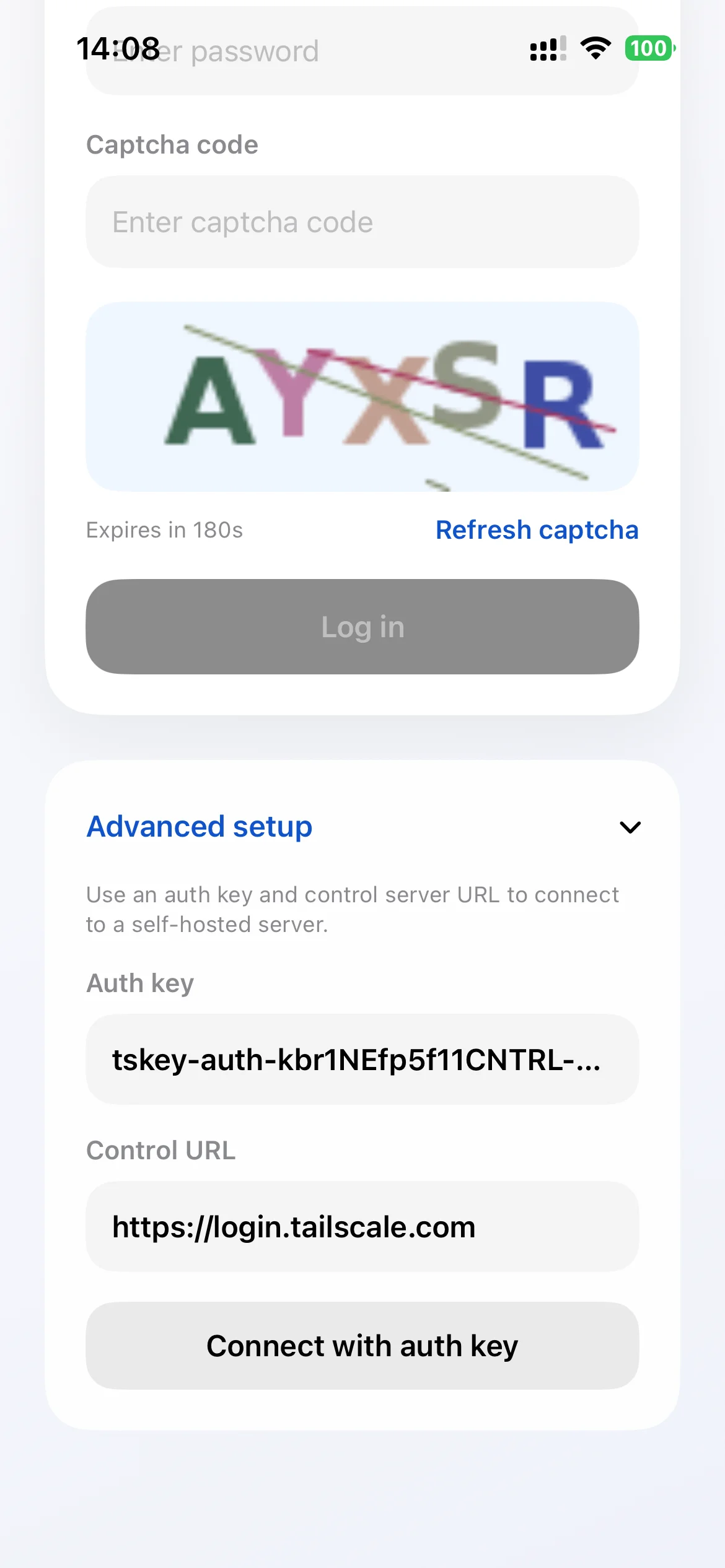
The Larktun iOS app currently offers three login methods. They share the same in-app capabilities. The only difference is where your network lives and which identity you choose to walk through the door.
Larktun account login. If you use Larktun's SaaS-managed network, just enter your account and password. This is the easiest path — the network, control plane, and relays are all managed by Larktun.
Auth key login. Regardless of whether your network runs on Larktun or elsewhere, a single key can represent a device identity. Paste the key into the app, and your iPhone or iPad joins the corresponding network.
Third-party Tailscale / self-hosted Headscale key login. This is the one we want to highlight today. Many teams and individuals already run mature private networks on Tailscale or a self-hosted Headscale. They do not want to move their entire infrastructure. They just want a good mobile entry point.
So we built Tailscale and Headscale key authentication directly into the app. You provide the control server address and an authorized key, and the app joins your Tailscale or Headscale network as a node.
No migration. No changes to your existing configuration. Your network stays your network. The Larktun app is simply a door you open from your mobile device.
After Logging In: Five Things You Can Do Immediately
Getting into the network is only the first step. What makes mobile access truly valuable is what you can do once you are in.
In the past, accessing devices inside a Tailscale or Headscale network from iPhone or iPad usually meant turning on system VPN first, then switching to another app to get anything done. It was a long path with many steps, and system VPN could conflict with work VPNs, campus proxies, or other tools.
The Larktun iOS app puts all of these actions in a single app, without occupying the system VPN slot.
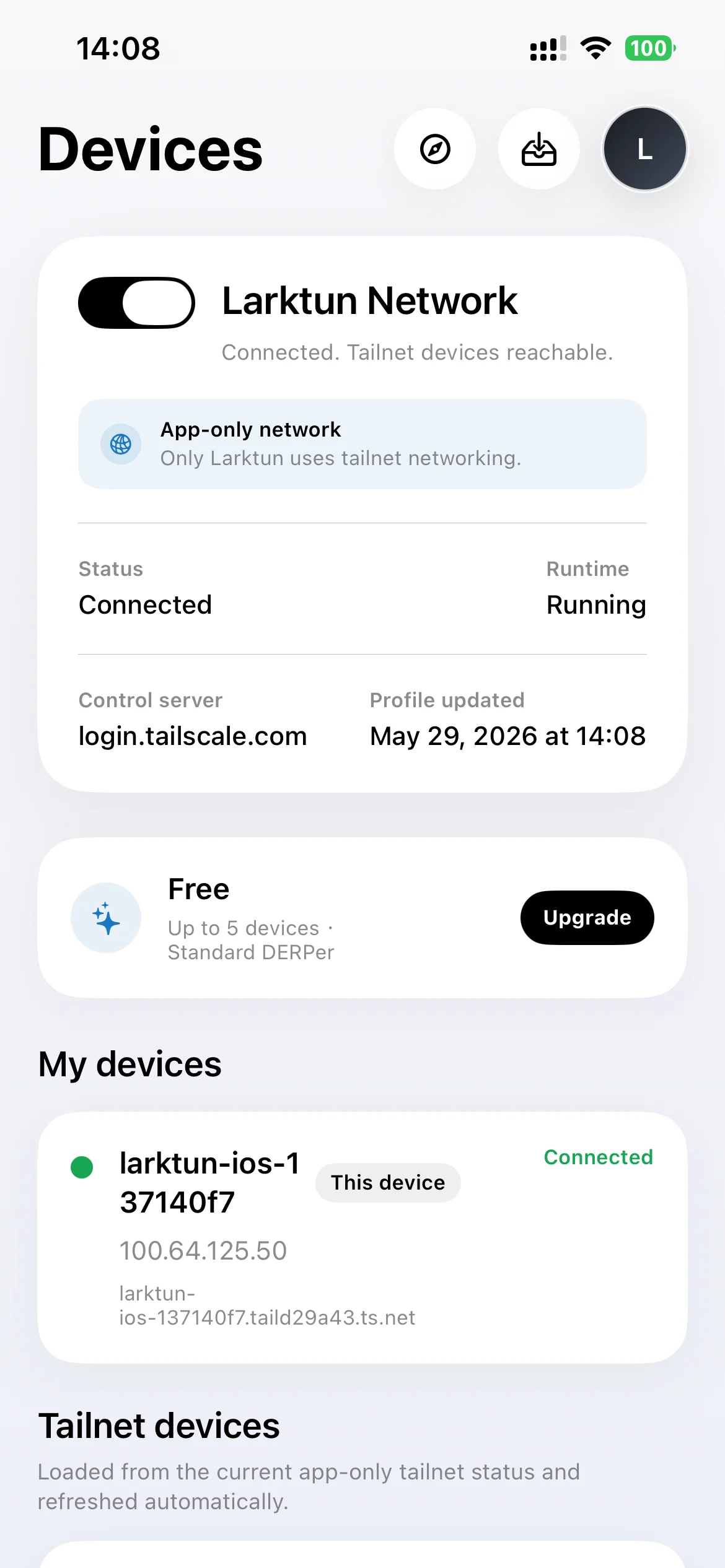
Check device status. After logging in, the app fetches the list of devices you have permission to see. Online status, IPv4 addresses, and MagicDNS names are all visible at a glance. From here you can copy an IP, run Ping, open SSH, or start Web browsing.
Ping connectivity check. This is the most basic and frequently used step in remote access. Tap a quick action on any device to confirm reachability and latency. No need to find a terminal tool or switch apps.
SSH terminal. Whether your servers are on a Tailscale or Headscale network, as long as the app has joined it, you can SSH in directly. Enter the address, port, username, and authentication method, and the terminal runs inside the app. Servers do not need to expose public port 22, and the app does not require system VPN.
SFTP file management. Often you do not need a full terminal session. Maybe you just want to download a log, upload a config file, confirm a file exists, or fetch a certificate. SFTP is built into the same app, sharing the same secure access path as SSH.
Private Web browsing. NAS admin panels, camera consoles, development Swagger pages, internal team dashboards — these services are normally only reachable inside the network or over VPN. The app's built-in Web browser can open private addresses inside your Tailscale or Headscale network directly, with no additional jump host or port mapping.
Why "No System VPN"?
We have talked about this concept repeatedly in earlier posts because it has a major impact on the mobile experience.
System VPN creates a network path for the entire device. It is powerful, but its boundary is also large. It affects the system network environment and can conflict with work VPNs, school VPNs, or proxy tools. In many real-world scenarios, users do not actually need their entire iPad or iPhone to enter a private network.
The Larktun app joins the network internally. It does not take over traffic from other apps or modify system proxy settings. You can keep using your existing network environment while completing all private network access within one app.
This design is especially important for third-party login. When your network runs on Tailscale or self-hosted Headscale, you likely already have an established system network configuration. The Larktun app will not conflict with it, and it will not ask you to disable your existing VPN or proxy.
A Few Details Worth Knowing
Control server address. When using a self-hosted Headscale, you provide the control server URL. The app supports custom addresses, as long as your Headscale service is reachable from the public internet or your current network environment.
Key permissions. When generating an auth key in the Tailscale or Headscale admin console, you can set ACL tags, expiration time, and more. The app joins the network with the identity tied to that key. Permissions are entirely controlled from your server side.
Cross-platform consistency. The same third-party login capability is built into the Android version. iPhone, iPad, and Android devices can all access your Tailscale or Headscale network in the same way.
Demo Video
For a hands-on look at the experience, watch this demo video:
[将Tailscale网络塞进iOS APP,无需系统代理就能免费使用,已过审上架] (https://www.bilibili.com/video/BV146V86eEWn/?share_source=copy_web&vd_source=9550a012bf30d7adb10982a6864c651c)
One App, Not Tied to One Network
At Larktun, we have never believed that users should move everything into "the Larktun network."
Some teams use Larktun's managed service — it is the fastest way to get started. Some teams self-host Headscale for complete control. Some teams use Tailscale's official SaaS and it has been running smoothly for them.
Wherever your network lives, mobile access should not be an extra burden. What the Larktun iOS app offers is this door you can open and use — keep your existing network, and use one app to do what you need to do from your mobile device.
The Larktun iOS app is now available on the App Store. If you use Tailscale or self-hosted Headscale, give the third-party login a try. If you have not yet tried Larktun's managed network, you are welcome to start with account login as well.