Access Larktun devices on iPad and iPhone without system VPN
Accessing a private network from iPad or iPhone has often meant turning on system VPN first, then switching between an SSH client, an SFTP client, a browser, or a remote desktop app. Each tool solves one part of the workflow, but in practice users keep jumping between apps while also checking whether the system VPN is still connected.
Larktun is taking a more direct path: put the network access workflow into one app.
The iPad/iOS version has been submitted for App Store review and is expected to meet everyone soon. It does not rely on system VPN permission. Instead, it joins the Larktun network inside the app, so users can view devices, test connectivity, SSH into hosts, manage files with SFTP, and open private Web services from one interface.
It Does Not Take Over the System Network
In Putting Larktun networking inside an app without VPN permission, we explained the technical direction behind this: in-app networking has a different boundary from system VPN.
System VPN creates a network path for the whole device. It is powerful, but it also affects the system network environment and may conflict with work VPNs, campus VPNs, or proxy tools.
The Larktun iPad/iOS app keeps a narrower boundary. Only the app itself joins the Larktun network. It does not take over traffic from other apps or change system proxy settings. You can keep using your existing network environment while opening Larktun to access your NAS, servers, dev machines, camera consoles, or internal Web services.
That matters on mobile devices. In many cases, users do not need the whole iPad to enter a private network. They need to complete a few clear actions:
- See whether a device is online.
- Ping a target and verify connectivity.
- SSH into a server to fix something.
- Use SFTP to fetch logs or upload configuration.
- Open an internal Web console inside the app.
When those actions live in one app, mobile private networking becomes much lighter.
Device List: Know What Is Online First
The first step in remote access is not connecting. It is understanding device state.
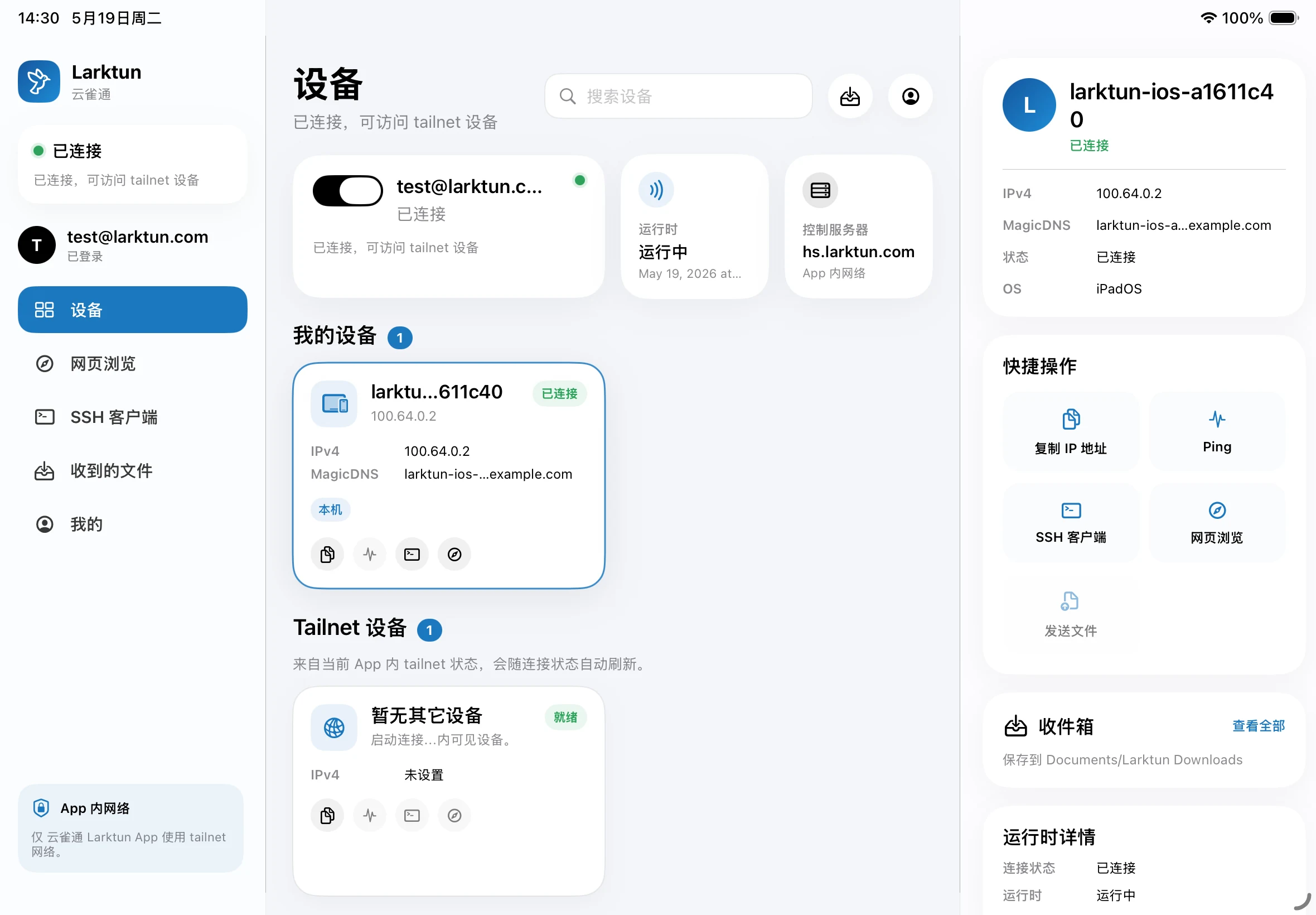
On iPad, the device list shows the app connection state, control server, runtime status, device IPv4, MagicDNS, quick actions, and inbox entry. Users can copy an IP, run Ping, open SSH, start Web browsing, or view received files directly from the device page.
This makes the question "can I reach that machine?" much clearer. Once the device is online and the address is visible, the next action is right there.
Ping: Quick Network Feedback on Mobile
Ping is small, but it is very useful for remote access.
When you are outside and need to reach a home NAS, office dev machine, or cloud server, the first thing to know is whether the target is reachable, what the latency looks like, and whether the current network path is stable.
By building Ping into the app, users do not need to find a terminal or switch to another diagnostic tool. Tap a quick action on the device, and you get the first connectivity signal.
SSH: Manage Servers without Public Port 22
SSH is one of the core features for this kind of app.
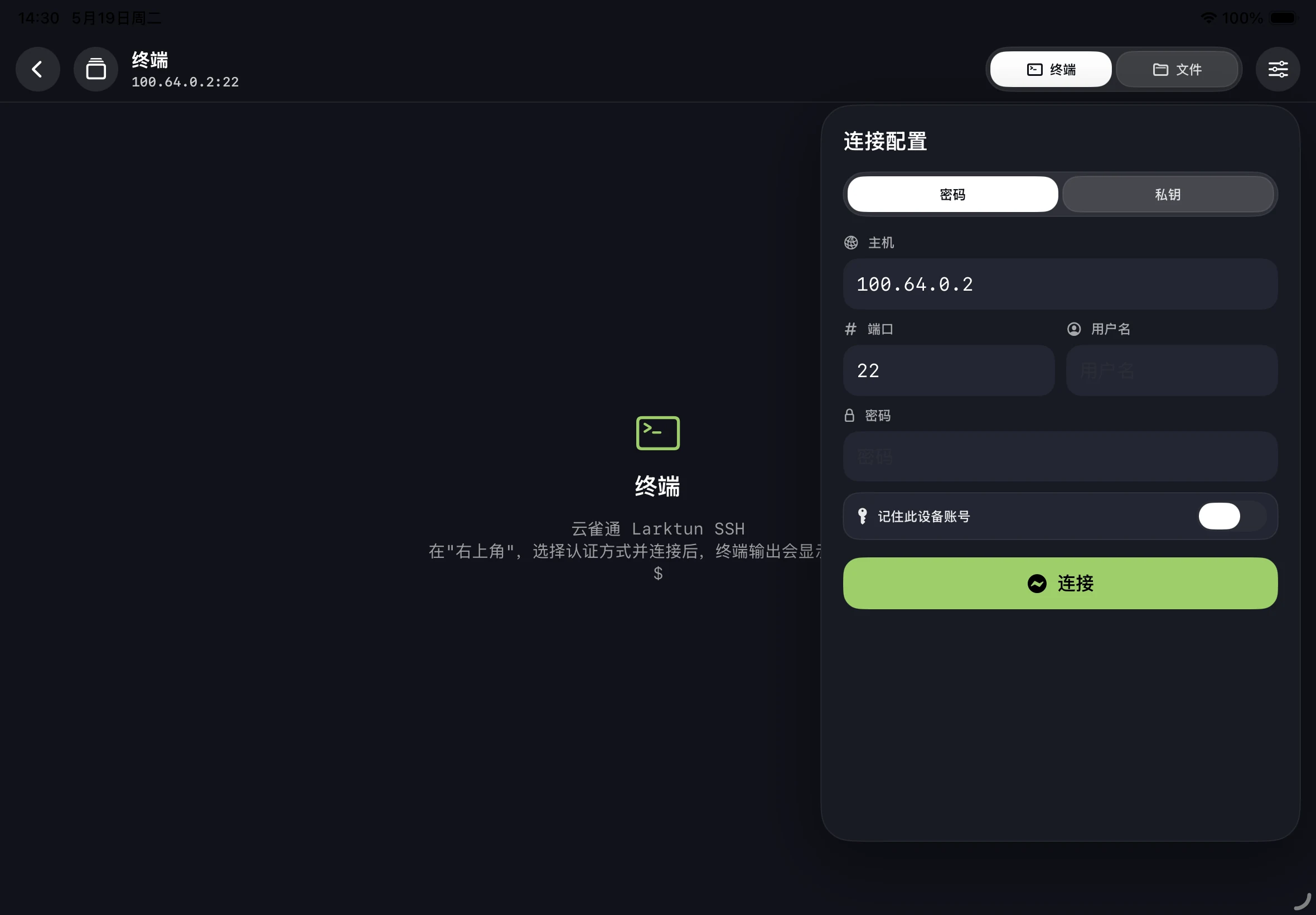
Inside the Larktun network, servers do not need to expose public port 22. The iPad or iPhone does not need to turn on system VPN either. Once the in-app network is connected, users can enter the target address, port, username, and authentication method in the SSH client and open a terminal.
After connecting, the terminal runs inside the app. Checking logs, restarting services, inspecting configuration, or running temporary commands can all be done from iPad.
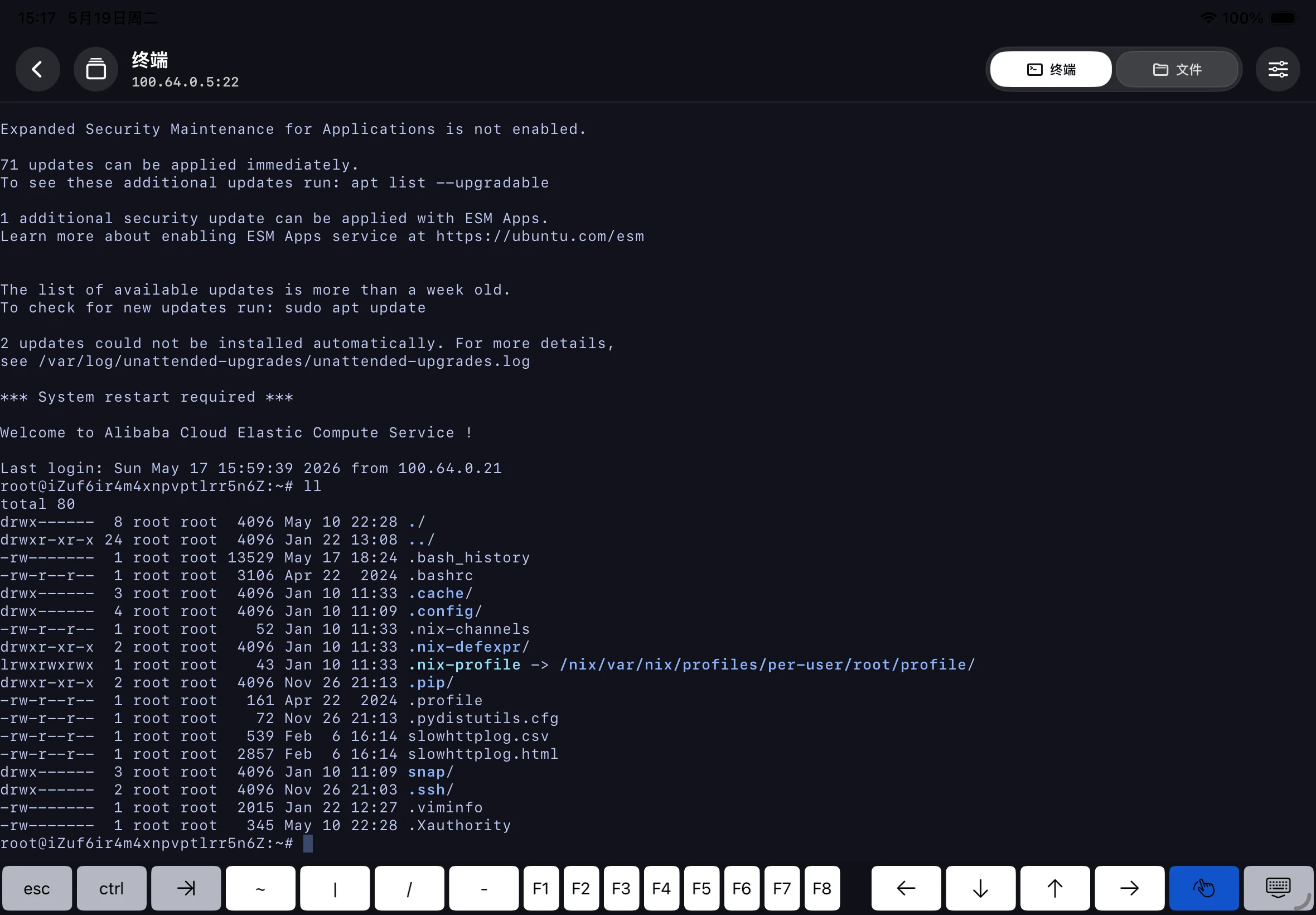
For developers, operators, and home server users, this shortens a long workflow: find a computer, turn on VPN, connect to the server. Now it becomes: open the app, tap a device, start SSH.
SFTP: File Management without Another App
Many maintenance tasks do not need a full command line. You may just want to download a log, upload a config file, fetch a certificate, or verify that a file exists.
That is why SFTP is also built into the same app.
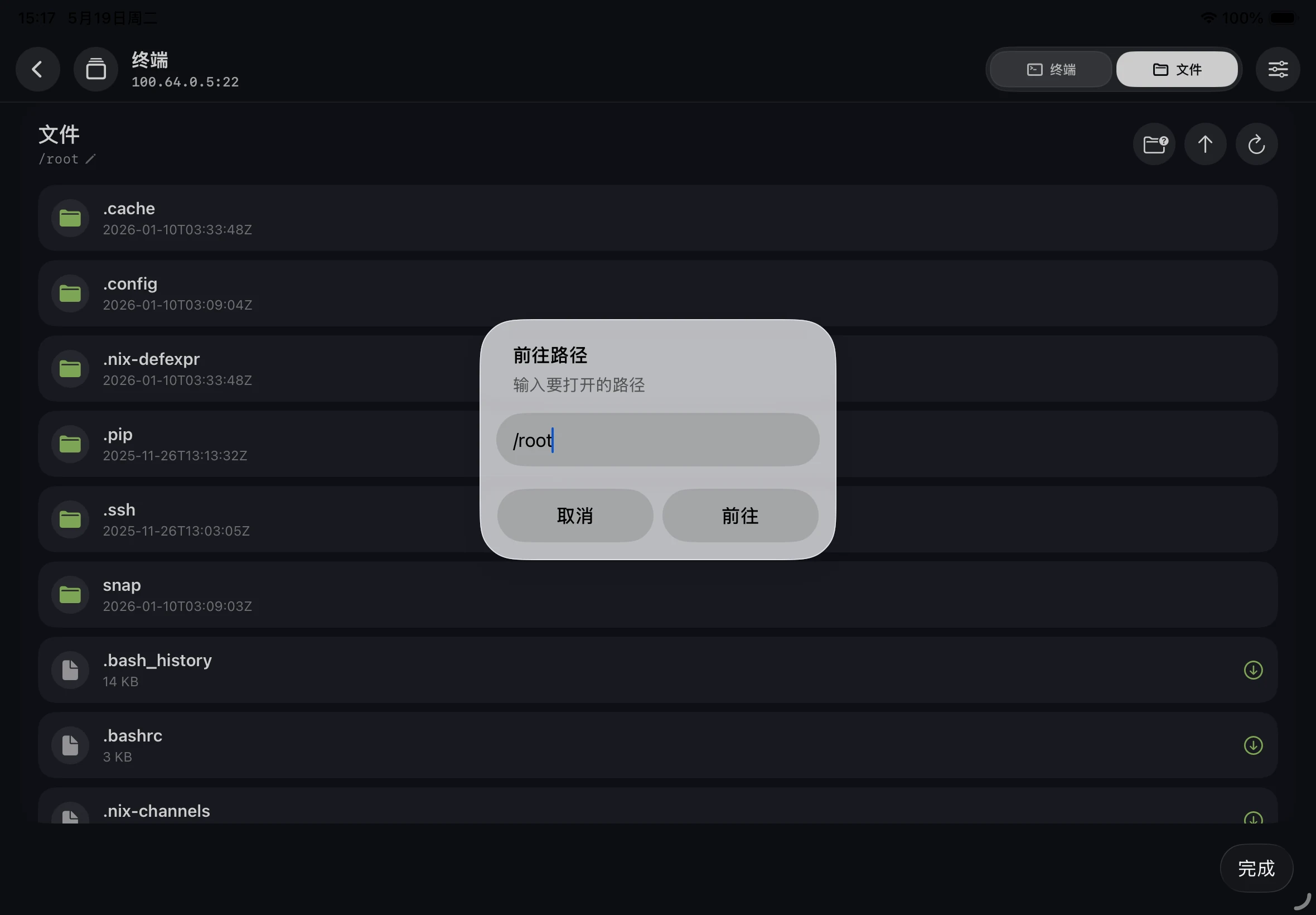
SFTP follows the same secure access idea as SSH: the target stays inside the Larktun network, and the access happens inside the app. Users do not need to switch between a networking app and a file manager, and internal machines do not need extra public exposure.
Web Browsing: Open Internal Services Directly
Many devices and services are ultimately managed through Web pages: NAS admin panels, camera consoles, development Swagger pages, internal dashboards, or AI Agent Web UIs.
With built-in Web browsing, the Larktun app can open private addresses directly. In the screenshot, iPad opens a Swagger page at 100.64.0.5:8080.
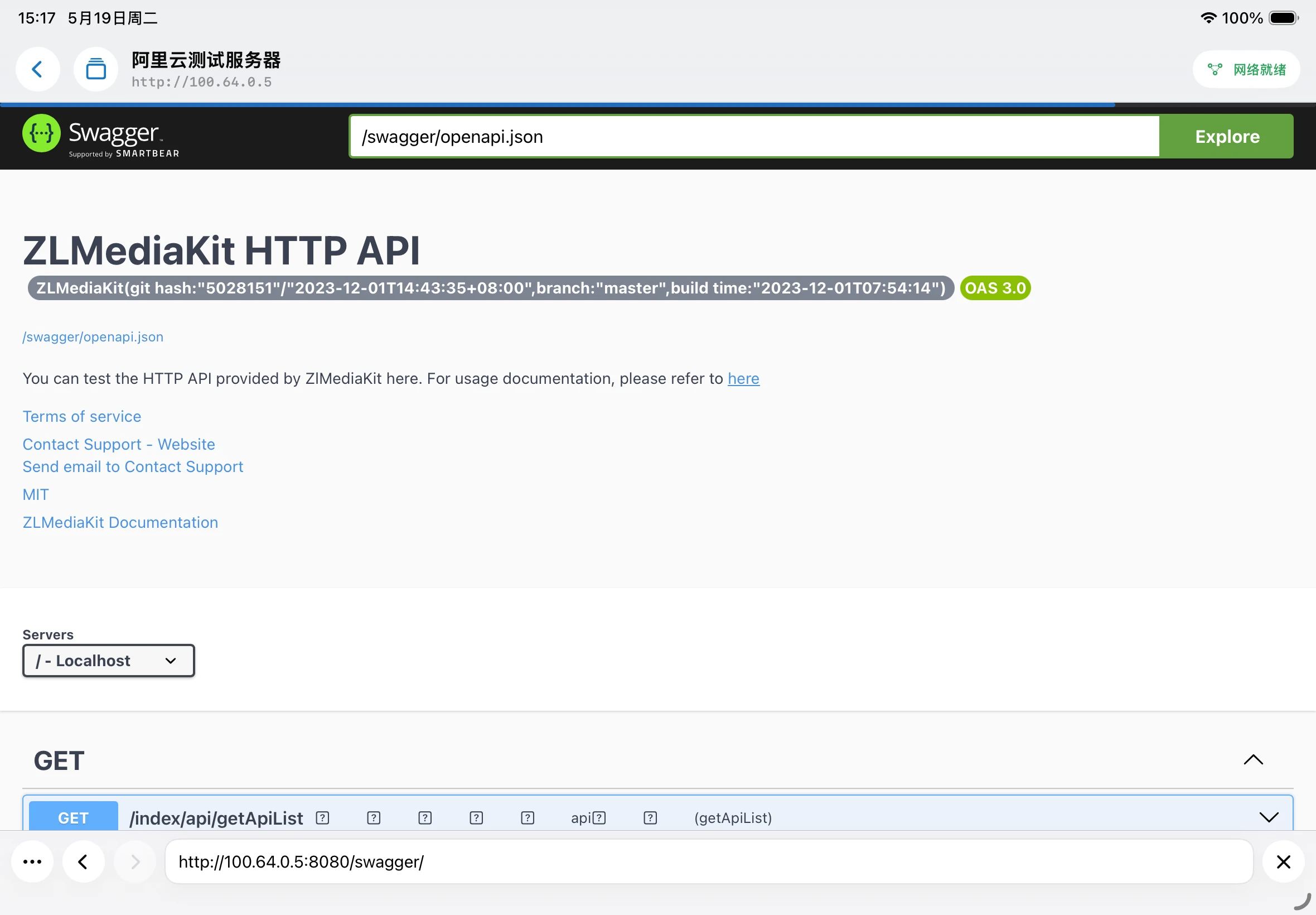
This is the value of avoiding system VPN: you are not moving the whole iPad network into a private network. You are completing a specific access task inside a specific app.
RDP, VNC, and the One-App Direction
The current version includes Ping, SSH, SFTP, and Web browsing. RDP remote desktop is mostly implemented and is now being optimized. It is expected to arrive in the next version.
VNC will come later as well.
The direction is clear: let users complete the main private-network access workflows in one app instead of jumping across several tools. This is especially useful on iPad. It is already a good device for mobile operations, remote work, and lightweight administration. If networking, terminal, files, Web, and remote desktop can live in one place, the workflow becomes much smoother.
Android Will Arrive Too
We also provide an Android version with similar capabilities, and it is planned to ship alongside the iOS/iPad version.
That means users are not locked to one device platform. iPhone, iPad, Android phones, and Android tablets can all use a similar in-app path into the Larktun network.
Demo Video
For an early look at the experience, watch this demo:
告别系统代理❌ iPad和iPhone上将Tailscale/Headscale网络内置到APP里📱✨ 云雀通 Larktun
Closing
Mobile access to private networks does not have to mean system VPN every time.
In many real workflows, users need a focused entry point: see devices, verify connectivity, log in to a server, manage files, open Web services, and later use remote desktop.
The Larktun iPad/iOS app is built around that entry point. It does not try to take over the whole system network. It brings the most common private-network operations into one app, with a clearer boundary and a more direct mobile experience.
Once App Store review is complete, we will bring it to everyone as soon as possible.