Put the Larktun Network Inside an App Without VPN Permission
On mobile devices, private device networking almost always raises the same question: do we need system VPN permission?
Whether you use Larktun or Tailscale, if you want every app on the phone to access a private network, the usual answer is yes. A system-level VPN tunnel gives the client full capability: traffic can be routed through the private network, DNS and routes can be handled centrally, and apps can access internal services without being aware of the tunnel. But this also creates practical friction. Users must understand and approve a VPN profile, apps may need extra platform capabilities, and the tunnel can conflict with a company VPN, campus VPN, or other proxy tools that already occupy the system network entry point.
So is there another path: can we use private device networking without requesting system VPN permission?
Yes. The key is tsnet.
From System VPN to In-App Networking
A traditional mobile networking client usually creates a virtual network interface at the operating system level. The OS sends traffic into that interface, and the client handles encryption, path discovery, peer-to-peer connectivity, relay fallback, and forwarding. It is powerful because it builds a road at the system layer, but it also naturally depends on VPN permission.
tsnet takes a different approach.
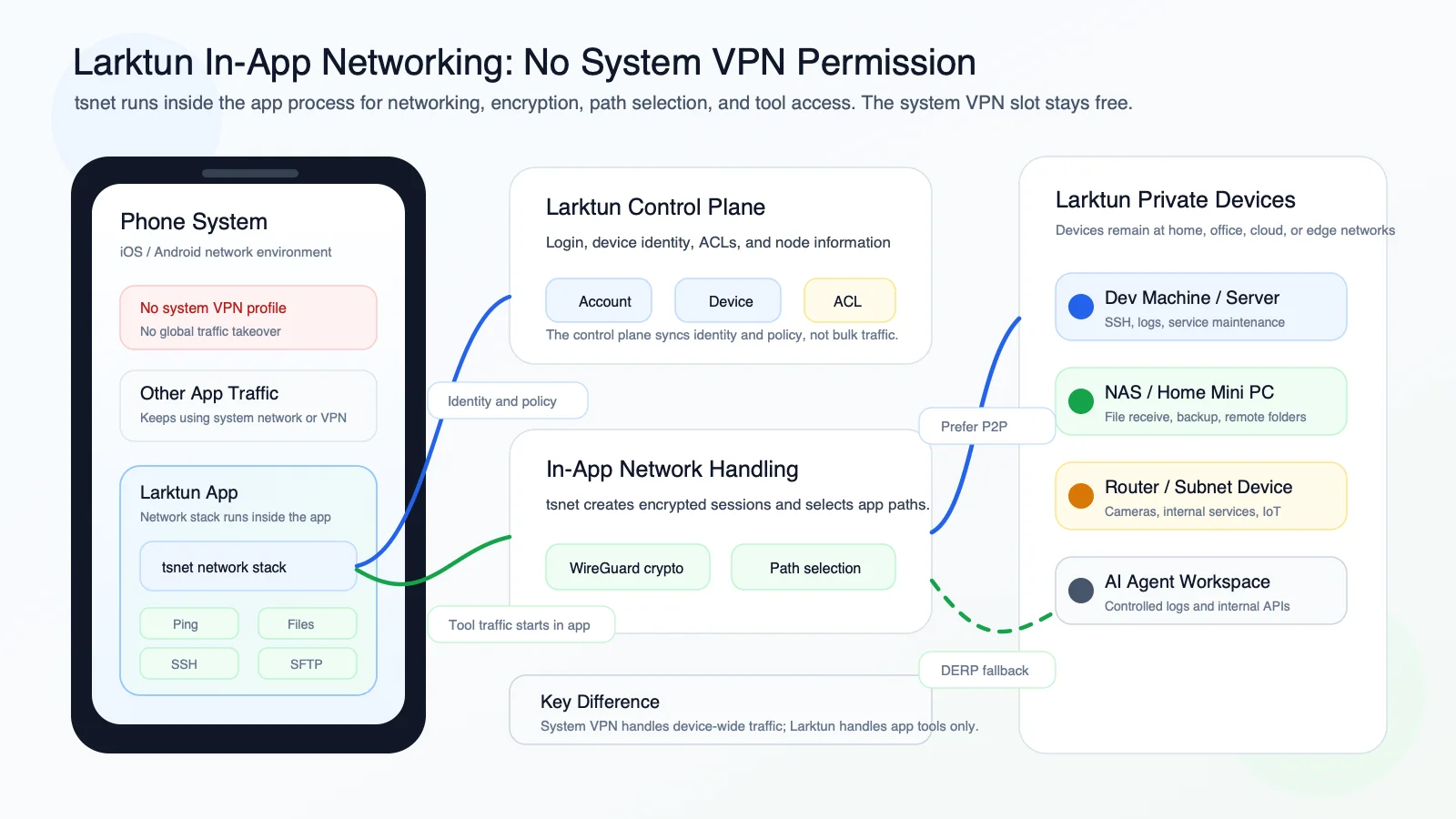
It embeds the Tailscale networking stack inside the application process, allowing the app itself to become a node in the Larktun network. Network identity, node discovery, encrypted connections, P2P paths, and relay fallback still exist. The difference is that traffic does not enter through a system VPN interface. It is initiated and handled by the app itself.
In other words, the app does not join the whole phone to the private network. It places the private-network capabilities it needs inside the app.
The result is very practical: the app can access devices and services in the Larktun network without occupying the system VPN channel. A user can stay connected to a company VPN for urgent work while opening the Larktun app to check devices at home or on a team network, transfer files, or log in to a server.
It Changes the Boundary
Avoiding system VPN permission does not simply mean doing less. More accurately, it changes the boundary.
The boundary of a system VPN is the whole phone. Once it is enabled, any app whose traffic matches the routing rules can theoretically enter the private network.
The boundary of a tsnet app is the app itself. Only capabilities implemented inside the app enter the Larktun network. Other apps are not affected, and their traffic is not quietly proxied. This makes the product more restrained: it does not take over the system, does not change global proxy behavior, and does not disturb the user's existing network environment.
That boundary works especially well for mobile utility scenarios. Users do not always need every app to access the internal network. Most of the time, they need to complete a few clear tasks:
- See which devices are online.
- Check latency to a device and whether the current path is direct.
- Send a file securely to a remote device, or receive one from it.
- SSH into a development machine, server, or home mini PC.
- Browse, upload, and download remote files with SFTP.
If these capabilities are handled by the Larktun app itself, system VPN permission no longer has to be the prerequisite.
What the Larktun App Can Do Today
With this in-app networking model, the Larktun app becomes a portable private-network toolkit.
View Networked Devices
After opening the app, users can view devices that have joined the Larktun network. Phones, computers, servers, routers, NAS devices, development machines, and mini PCs can all appear in one device list.
This looks simple, but it matters. The first step of remote access is not connecting. It is knowing whether the device is online, what it is called, and which network boundary it belongs to.
Ping Devices
The app can ping networked devices to show latency and whether the current connection is direct.
For remote work and operations, this is valuable context. A direct path usually means a shorter route and lower latency. If NAT, carrier networks, or office network restrictions require relay fallback, the user can understand that before starting the task.
Send and Receive Files
File transfer is one of the most common mobile scenarios.
You may need to send a screenshot from your phone to a development machine, pull logs from a server, or deliver a temporary configuration file to a home computer. The Larktun app can send and receive files inside the private network, using an authenticated and encrypted path instead of exposing a public port.
SSH
SSH is a core entry point for development, operations, and AI Agent workflows.
With built-in SSH, users can connect to servers, development machines, or home mini PCs inside the Larktun network without opening public 22 ports. For urgent production checks, service restarts, or log inspection, this is much more direct than first finding a computer, switching VPNs, and confirming the network environment.
SFTP
Sometimes the command line is not the fastest interface. You only want to open a directory, retrieve a file, or upload a new config.
SFTP support makes the Larktun app more than a connection tool. It turns a remote device's filesystem into an interface that is practical on mobile.
Why This Matters for AI Agents
More workflows are starting to use AI Agents. Agents may need to read logs, call internal services, access development machines, operate test environments, or perform controlled deployment and diagnostics.
The more capable an agent becomes, the more important the network boundary becomes.
Exposing critical services directly to the public internet is not a good answer. Sending all traffic through a global proxy may not fit least-privilege design either. A better approach is to keep the required entry points inside a clear private network, then control what the agent can reach through device identity, account permissions, and ACLs.
This is where the Larktun app is useful. It puts remote work, mobile operations, and AI Agent access into the same networking model: devices are online, identities are explicit, and access paths are controlled. Users do not need to grant broad system-level network permission just to reach a server for a focused task.
A Better Mobile Networking Experience
Skipping system VPN does not replace every VPN scenario.
If you need any app on the phone to access an internal network, a system VPN is still the complete option. But if your goal is to provide focused, understandable, and controlled private-network tools inside one app, tsnet is an elegant choice.
It gives Larktun a different mobile experience:
- No system VPN permission, which lowers the authorization and usage barrier.
- No occupation of the system VPN channel, so it can run alongside tools such as a company VPN.
- No global traffic takeover, making the security boundary easier to understand.
- Network handling stays inside the app, keeping features focused and risk easier to reason about.
- Device identity, encrypted connections, direct-path detection, and relay reachability remain available.
For remote work, safe AI Agent usage, network security, and device access governance, this is a practical middle ground. It does not try to take over the whole phone. It puts the most common and critical network capabilities into the app.
Closing
Mobile private networking has more than one shape.
A system VPN is ideal when you need to take over network access for the whole device. tsnet is ideal when you want to embed private-network capabilities into an application. The former is a system-wide tunnel. The latter is a focused toolkit you can open when there is a task to handle.
The Larktun app chooses to place the network inside the app itself. Without VPN permission, users can still view devices, test connectivity, transfer files, SSH, and SFTP into trusted devices.
This does not loosen the security boundary. It makes the boundary clearer.
When devices, permissions, and paths are brought into the Larktun network, remote work becomes calmer, AI Agents can be used more safely, and individuals or teams can manage device access with lower operational cost.
App Video
For a more visual mobile demo, watch this video: